Colorful Flashlight: See How with App
Announcements
Color flashlight with app is a modern tool that turns your phone’s flash camera into an adjustable light source, allowing you to choose from hundreds of colors and effects. This type of app has revolutionized the way we use our smartphone’s lighting, offering creative alternatives beyond the standard white flashlight function.
The technology behind these applications uses the LED of the rear camera of your device as a controllable light emitter. The app communicates with the hardware of the mobile through operating system APIs, allowing you to adjust the intensity, frequency and colors of the emitted light. This works both on iPhones and on Android devices, as both operating systems allow access to flash control through specific programming layers.
To install a color flashlight app, the first step is to access the app store of your phone, either the Apple App Store or the Google Play Store. Enter “color flashlight” or “light with colors” in the search bar and identify an app with good user ratings. After finding a reliable option, tap the download button and wait for the installation to complete, which usually takes a few seconds depending on the speed of your internet connection.
Announcements
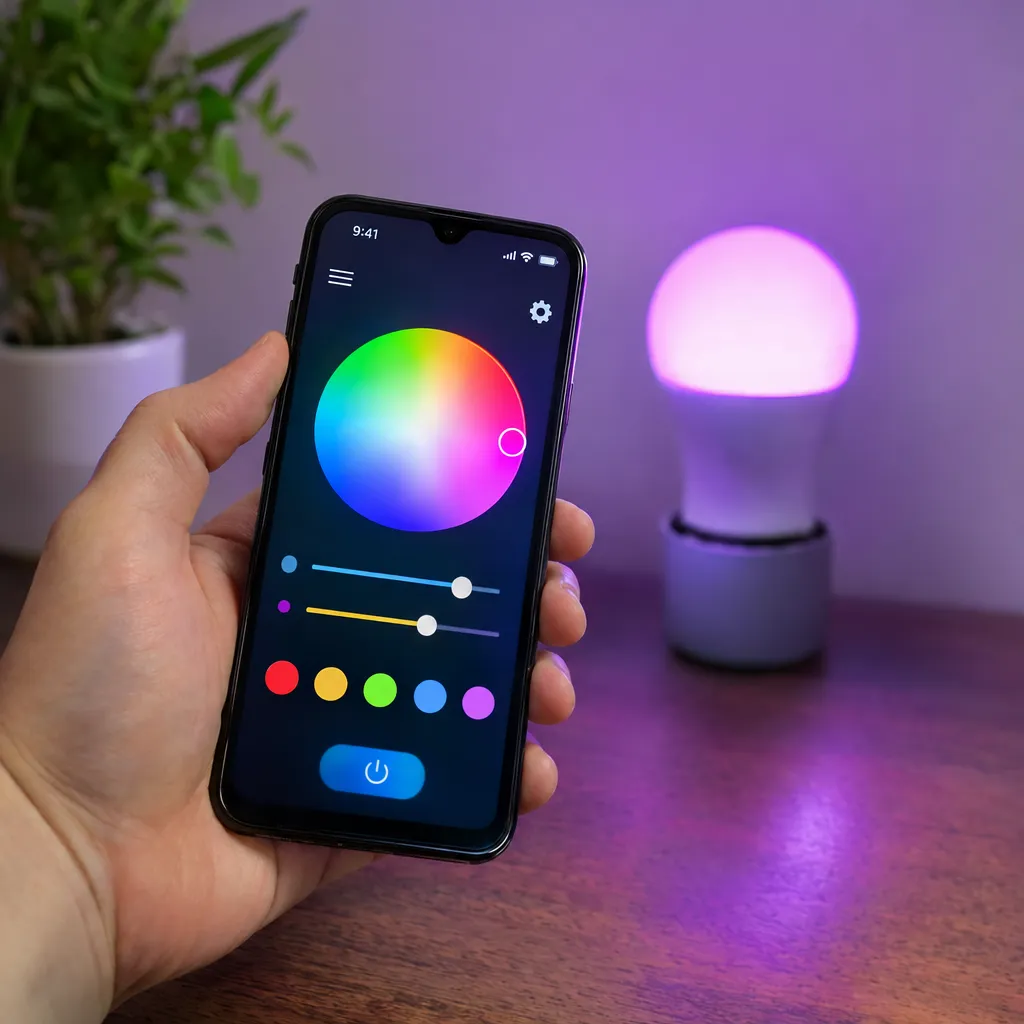
Customizing colors is one of the most attractive features of these applications and requires only a few taps on your device screen. After opening the app, you will see an available color palette or an interactive color wheel, where you can select specific tones by directly tapping the desired color. Many applications also allow you to adjust the brightness and saturation through sliders, offering even more flexibility in customizing the lighting you want to create.
Additional features vary by app, but often include blink modes, rainbow effects, smooth transitions between colors, and even synchronization with ambient music.Some apps also offer pre-configured scenario templates such as “party”, “read”, “meditation” or “emergency” that automatically enable the most appropriate colors and intensities for each situation.
 Colorful Lantern
Classification:
^^^^^^^^^^^^^^^^^^^^^^^”’
3.86
Age Classification:
Free Classification
Author:
Moonshine Apps
Platform:
Android
Price:
Free
▶Download on Google Play
Long-term use of the colored flashlight can generate heating on the device, especially on hot days or if used continuously for more than 30 minutes.To avoid damage to the LED or battery, it is recommended to periodically pause and monitor the temperature of the device during lighting sessions. In addition, battery consumption is significant when the flash is on, so disable the application when not using to preserve the charge of your smartphone.
Compatibility with different phones is practically universal, since all modern smartphones have integrated LED flash.However, some applications may offer limited functionality on older devices that do not support certain hardware features or specific versions of the operating system.If you have a mobile phone with a few years of use, it is prudent to check the compatibility requirements of the desired app before downloading, reading user reviews with devices similar to yours.
The practical uses of the colored flashlight go far beyond fun, as it becomes a functional tool in various everyday situations. Photographers use to create lighting effects in videos, educators employ in interactive presentations, parties and events benefit from personalized atmospheres, and even security researchers take advantage of different colors for inspection purposes. People with special visual needs also find utility in specific colors that facilitate their orientation and visual comfort in low light environments.
Starting from Zero: Practical Step by Step Guide
If you have never used a colored flashlight, the initial setup process is extremely simple and intuitive. After installing the app, it will prompt you for permissions to access your device’s flash, confirming that you want the app to control the camera and its lighting components. Grant the necessary permissions by tapping “Allow” or “Agree” as your device interface requires.
The first access to the application interface will probably show a large button in the center of the screen to activate the flashlight or a color palette already ready to use. Tap the desired color and you will see your mobile phone flash light up immediately with that shade. This real-time response offers instant feedback on your choice, facilitating quick adjustments without the need for complicated processes or additional confirmations.
Exploring the Palette of Available Colors and Effects
Most color flashlight apps offer a palette ranging from 20 basic colors to over 300 options in premium versions. Warm colors like red, orange and yellow are ideal for creating warm, festive atmospheres.Cold colors like blue, purple and green are perfect for relaxation environments, meditation or scenic effects at events.
Transition effects allow the color to change smoothly from one tone to another, creating a dynamic and sophisticated visual experience. The blink effect synchronizes lighting with beats, being useful for creating rhythm at parties or presentations. Some applications include special modes such as “neon” that intensifies color saturation, or “pastel” that reduces intensity to softer and more pleasing to the eye indoors.
Adjusting Intensity and Brightness As Needed
Light intensity is a key parameter that you can adjust through sliders present in most applications. Whether you are in a large space or outdoors, increasing brightness to the maximum ensures that lighting is noticeable from a distance.For indoor environments or when you are near the object you want to illuminate, reducing intensity offers more visual comfort and saves battery.
Brightness also influences the power consumption of your device significantly, so using intermediate levels when possible is a smart strategy. Many experienced users have switched between different brightness levels during the same session, increasing when necessary maximum visibility and reducing to moments of lower demand. This dynamic adaptation extends battery life while maintaining the functionality of the application.
Advanced Features for Experienced Users
Users who want to go beyond basic functionality find in many applications options to create custom presets, saving specific combinations of color, brightness and effect for future reuse. If you often use the same flashlight setting for reading, for example, you can save this preset and access it with a single tap in the next few times. This functionality saves time and offers consistency for repetitive scenarios.
Some advanced applications allow synchronization with other applications, such as music players, using the application as an audio viewer. When a song plays in the background, the color flashlight responds to frequency and rhythm variations, pulsing and changing colors synchronously. This feature is especially appreciated at parties, events and visual content creations where integration with audio creates a complete multisensory experience.
Essential Care for Extended Use
Using the colored flashlight for continuous hours can cause the device to overheat, particularly if your phone is already hot from sun exposure or other reasons. The LED can suffer premature degradation when operated at elevated temperatures for extended periods, reducing its efficiency and service life. To avoid these problems, take breaks every 30 or 45 minutes, allowing the device to cool naturally.
Battery consumption is another critical aspect to consider, especially if you plan to use the app in long events or emergency situations where charging your mobile phone can be vital.If the battery is a concern, lower the brightness, disable complex visual effects and avoid using too saturated colors that require higher power from the LED. Keeping the power saving mode activated in parallel with the use of the colored flashlight also contributes to extending the battery charge.
Compatibility Between Different Brands and Models
Virtually all modern smartphones, regardless of brand or operating system, have the ability to run color flashlight applications because they all include integrated flash LEDs. Top-of-the-line devices from Samsung, Apple, Xiaomi, Motorola and other brands work perfectly with these applications without any technical restrictions. The main difference is in the intensity and quality of the LED, where some Premium models offer more powerful LEDs and with better thermal dissipation.
Older Android devices, released before 2010, may have difficulty running modern applications that require specific versions of the operating system. Iphones 5s and earlier models may also have limitations with advanced functionality in some current applications. Before downloading, check the minimum operating system version required by the application and refer to the description to confirm that your device meets the requirements.
Practical Applications in Day to Day
Emergency situations like power outages or accidents in places without proper lighting benefit significantly from the colored flashlight, which offers an alternative to the standard white flashlight.Although every color works, pure white or yellow usually offers better visibility in emergencies, while different colors can be useful for signaling to others. Safety and rescue professionals often use specific colors for status communication in crisis situations.
Amateur photography and videography rise when you have access to controllable color lighting, allowing creative experiments without investment in costly professional equipment. Content creators for social networks use the colored flashlight to generate aesthetic and atmospheric videos, establishing modes and transitions that complement visual narratives. Social events such as birthday parties and thematic meetings gain additional visual dimension with color lighting synchronized with the decoration or movement of people.
Educators and speakers benefit from the colored flashlight in dimly lit environments or during presentations in dark auditoriums, using different colors to highlight specific elements or maintain audience attention.Professional photographers with budget constraints have experimented with colored smartphone flashlight as a complement to the main lighting in low-cost setups.Mediators and practitioners of holistic therapies take advantage of specific colors such as blue and green, which are known to have calming effects on human psychology and promote relaxing environments.
Choosing the Best App For Your Needs
When evaluating which color flashlight app to download, carefully read user reviews to understand what features work well and which have problems. Apps with hundreds of positive reviews and rating above 4.5 stars usually offer a reliable and well-developed experience.Pay attention to recent reviews that mention compatibility with your specific version of the operating system and mobile brand.
Try the free version of the app before you consider buying a premium version, as many apps offer basic functionality at no cost. Paid versions often unlock advanced features like unlimited presets, music-synchronized effects, or advertising removal.Some apps offer freemium models where most of the functionality is free, but certain special effects require in-app purchase.
Also make sure the app respects your privacy and does not ask for unnecessary permissions that are not related to the operation of the flashlight, such as access to contacts, messages or location. Well-programmed apps only ask for essential permissions to access the flash and camera of the device. Read the privacy policy when available and look for alternatives if the app seems to collect data in an excessive or suspicious way.
Perfectly Customizing Every Use Situation
Creating custom presets for different scenarios makes using the colored flashlight much faster and convenient during situations where you need to act quickly. A preset for “Night Reading” could include a soft white color with reduced brightness, while another for “Party” would have vibrant colors with a winking effect. Name your presets clearly and descriptively to instantly identify them when you need to.
Experimenting with different combinations is part of the process of figuring out what works best for you and your specific needs. Take the time to test different colors in various environments, watching how your perception changes depending on the surrounding space. Colors that look bright in a dark environment may appear faint in places with natural light, so hands-on experience is key to developing your expertise with the tool.
Share your favorite presets with friends or family if the app allows you to export settings, creating a collective library of useful combinations.Many apps include communities or forums where users share their best settings and tips. Joining these communities broadens your understanding of the possibilities of the colored flashlight and offers inspiration for new ways to use the tool.
Keeping Your Device Safe While Using
Monitoring the temperature of your smartphone during continuous use of the colored flashlight is essential to avoid damage to the hardware.If you notice that the device is too hot to the touch, especially near the rear region where the LED is located, disable the application immediately and let the phone cool in a well-ventilated place. Putting the device in contact with cold surfaces such as glass or metal tables helps heat dissipation faster.
Do not leave the application running accidentally in your bag or backpack, as this can damage internal components of the device and completely deplete the battery. Always close the application when you are finished using by pressing the shutdown button or leaving the application completely. Setting up a seniority of running in background in your phone settings ensures that the colored flashlight does not accidentally become active when you are not noticing.
If your phone has a protective cover, it can interfere with the quality of the light emitted by the LED, especially if it is opaque or too thick. Transparent or translucent covers offer better light transmission, although they still cause some quality reduction. If you use the colored flashlight often, consider using a cover that does not significantly obstruct the LED, or temporarily remove the cover when you need maximum lighting quality.
Expanding Possibilities with External Resources
Some creative users associate the colored flashlight with homemade physical diffusers made of translucent materials such as tracing paper, colored glass jars or even plastic bottles. These diffusers modify the dispersion and quality of light, creating even more interesting and sophisticated visual effects. Experimenting with different materials turns your smartphone into a versatile photographic tool without the need for investment in expensive professional equipment.
Mirrors and reflectors placed strategically around the LED can amplify light and direct it to specific locations, offering greater control of lighting. Photographers improvise often use small bag mirrors to redirect the light from the colored flashlight into their low-budget creations. These practical tricks demonstrate that creativity is just as important as the technology itself when it comes to maximizing the potential of the tool.
Combining your color flashlight with other smartphone apps, such as a timer or video camera, creates unlimited possibilities for visual content.You can record dynamic lighting videos, take long exposure photos with mobile light effects, or even create time-lapses with synchronized color transitions. Exploring these app combinations unveils layers of creativity that you might not have initially considered.